Proxmox VE 8: Advanced Administration and Optimization
Overview
Learn advanced Proxmox VE administration and optimization skills. Dive into practical applications, mastering VM migrations from VMware, Hyper-V, and VirtualBox, automating workflows via the Proxmox API, configuring complex networking and switching environments, and implementing Ceph distributed storage. Through hands-on exercises, you'll gain proficiency in advanced monitoring, security measures like data encryption, and tackle real-world challenges, giving you the skills to manage and optimize your virtualized infrastructures.
Learn more about Proxmox: Proxmox Virtual Environment
Best For
- Experienced Proxmox VE administrators looking to deepen their skills
- Professionals managing multi-node virtualization clusters
- System engineers planning VM migrations from VMware, Hyper-V, or VirtualBox
- Technical staff responsible for enterprise storage and monitoring
Prerequisites
- Completion of Proxmox VE 8 Setup and Management or equivalent hands-on experience
- Working knowledge of Linux command line and system administration
- Understanding of basic networking and storage concepts
Lab Exercises (18 labs)
| # | Title |
|---|---|
| 1A | Importing Virtual Machines from VMware ESXi |
| 1B | Importing Virtual Machines from Microsoft Hyper-V |
| 1C | Importing Virtual Machines from VirtualBox |
| 2 | Advanced User Management |
| 3 | Management Using the API Interface |
| 4 | Creating Non-Linux Virtual Machines |
| 5 | Hookscripts and Snippets |
| 6 | Exploring Configuration Files |
| 7A | Advanced Monitoring |
| 7B | Advanced Alerts |
| 8 | Virtual Machine and Container Monitoring |
| 9A | Virtual Machine and Container Viewing With noVNC and xterm.js |
| 9B | Virtual Machine and Container Viewing With SPICE |
| 10 | Cloud-Init Configuration |
| 11 | Data Encryption |
| 12 | Advanced Networking and Switching |
| 13 | Ceph and Distributed Storage |
| 14 | Challenge Lab |
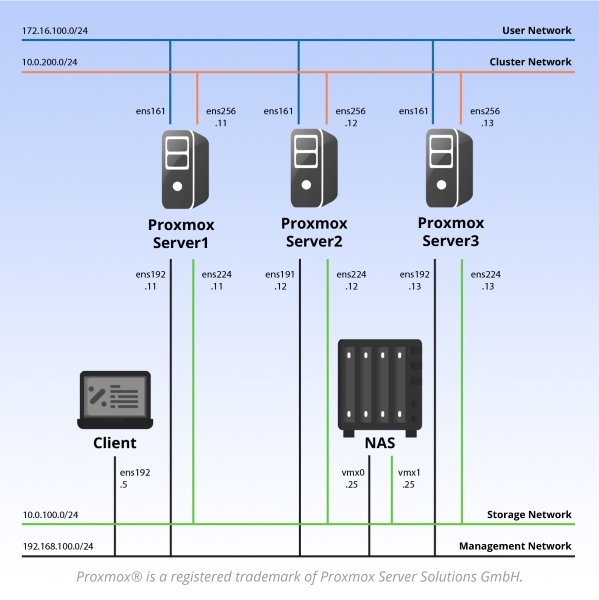
Pod Topology Proxmox VE 8: Advanced Administration and Optimization Pod
Virtual Machines
Documentation & Resources
- Pod Planning and Installation Guide (PDF)
- Pod Install Guide for Proxmox VE (external)
- Release Notes (external)
Setup: Install Proxmox VE 8: Advanced Administration and Optimization via the Course Manager. See the Admin Guide →