Red Hat OpenStack Administration I (CL110)
Overview
Red Hat OpenStack Administration I (CL110) is designed for system administrators who are intending to implement a cloud computing environment using Red Hat OpenStack Platform. This course will teach learners to install a proof-of-concept and configure, use and maintain Red Hat OpenStack Platform. The focus on this course will be managing OpenStack using the Horizon dashboard and the command-line interface and managing instances.
Learn more about Red Hat: Red Hat Academy
Lab Exercises (13 labs)
| # | Title |
|---|---|
| 1 | Launching an Instance |
| 2 | Organizing People and Resources |
| 3 | Verifying OpenStack Services |
| 4 | Managing Linux Networks |
| 5 | Deploying an Internal Instance |
| 6 | Managing Block Storage |
| 7 | Managing Objects |
| 8 | Deploying an External Instance |
| 9 | Customizing Instances |
| 10 | Deploying Scalable Stacks |
| 11 | Installing OpenStack |
| 12 | Deploying an FTP Server |
| 13 | Deploying a Web Server |
Pod Topology Red Hat OpenStack Administration Pod
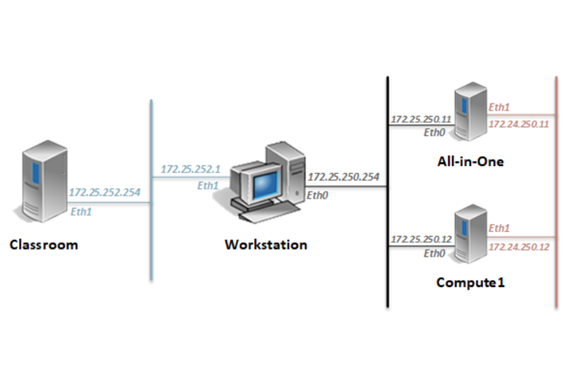
Virtual Machines
Documentation & Resources
- Red Hat OpenStack Administration Installation and Configuration Guide (PDF)
- Release Notes (external)
Setup: Install Red Hat OpenStack Administration I (CL110) via the Course Manager. See the Admin Guide →
Related Labs
Red Hat System Administration I (RH124-RHEL9.3)
Gain Linux administration "survival skills" by focusing on core administration tasks.
Red Hat System Administration II (RH134-RHEL9.3)
Designed for learners who have completed RH124, these labs go deeper into enterprise Linux admini...
Red Hat Enterprise Linux Automation with Ansible (RH294-RHEL9)
Gain the skills needed to manage large numbers of systems and applications efficiently and consistently.
Red Hat OpenStack Administration I: Core Operations for Domain Operators v16.1
Learn how to implement a cloud computing environment using the Red Hat OpenStack Platform.