NDG CySA+
Overview
The NDG CySA+ labs provide hands-on practice in behavioral analytics skills to identify vulnerabilities, threats, and risks to an organization. Learners gain the skills needed to identify and combat malware, configure and use threat-detection tools, and secure and protect the applications and systems within an organization.
What You Will Learn
- Enumerate networks and scan for vulnerabilities using automated tools
- Analyze packet captures and log data for indicators of compromise
- Perform memory and digital forensic analysis on compromised systems
- Configure and test Snort IDS rules and OSSIM intrusion detection
- Execute incident response procedures and secure data with encryption
Best For
- Learners preparing for the CompTIA CySA+ (CS0-002) certification exam
- Security analysts building skills in threat detection and behavioral analytics
- Professionals moving into security operations center (SOC) roles
- Cybersecurity practitioners who want hands-on experience with SIEM and IDS tools
Prerequisites
- Foundational security knowledge (CompTIA Security+ or equivalent experience)
- Familiarity with network protocols and traffic analysis
- Basic Linux command line proficiency
Lab Exercises (21 labs)
| # | Title |
|---|---|
| 1 | Network Enumeration |
| 2 | Web Application Scanning |
| 3 | Windows CLI Tools |
| 4 | Linux Command Line Tools |
| 5 | Vulnerability Scanning |
| 6 | Packet Analysis |
| 7 | Host Hardening |
| 8 | Understanding ACL's and Host-Based Firewalls |
| 9 | Working with Log Data |
| 10 | Memory Forensic Analysis |
| 11 | Digital Forensic Analysis |
| 12 | Extracting Data from a Compromised Machine |
| 13 | Password Cracking |
| 14 | Packet Crafting |
| 15 | Log Analysis with Bash Scripting |
| 16 | Configuring a Firewall |
| 17 | Incident Response Procedures |
| 18 | Securing Data Using Encryption Software |
| 19 | Creating Rules and Testing Snort IDS |
| 20 | Network Intrusion Detection with OSSIM |
| 21 | Host Intrusion Detection with OSSIM |
Pod Topology NDG CySA+ Pod
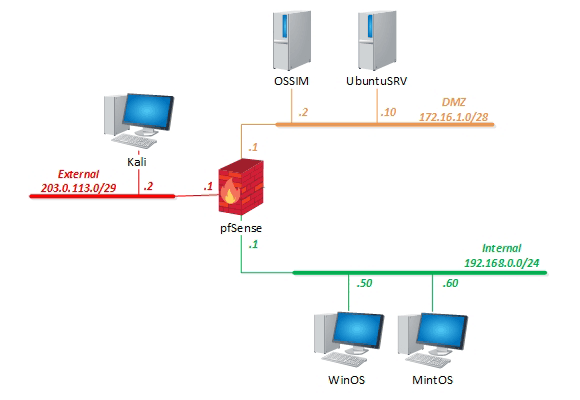
Virtual Machines
Documentation & Resources
- CySA+ Pod Installation Guide (PDF)
- CySA+ Pod Installation Guide (Online) (external)
- Release Notes (external)
Setup: Install CySA+ via the Course Manager. See the Admin Guide →
Related Labs
NDG Security+ v4
Hands-on practice in network security principles and best practices, aligned to CompTIA Security+...
CCCCO CySA+
State-funded CySA+ labs providing hands-on practice in behavioral analytics and threat detection skills.
NDG Forensics v2
Hands-on experience in digital forensics practices including imaging, analysis, and chain of custody.
NDG Ethical Hacking v2
Hands-on experience conducting ethical hacking practices including reconnaissance, exploitation, ...
What organizations are saying about Cybersecurity
NETLAB+ has enabled us to provide hands-on training that would otherwise be financially out of reach for individual colleges.
BACCC Program Coordinator
Program Coordinator, Bay Area Community College Consortium
Our students are getting jobs at national labs, at Intel, at Sandia — places they never thought they could work.
IT Program Director
IT Program Director, Northern New Mexico College