Cybersecurity Gateway PAN8
Overview
The Cybersecurity Gateway labs enable learners to build an understanding of the fundamental principles of networking. Through hands-on practice, learners will explore the general concepts involved in maintaining a secure network computing environment, using Palo Alto Networks firewalls. Learners examine and implement basic networking configuration techniques, as well as describe general networking fundamentals.
Learn more about Palo Alto Networks: Palo Alto Networks Cybersecurity Academy
Lab Exercises (11 labs)
| # | Title |
|---|---|
| 1 | Configuring TCP/IP and a Virtual Router |
| 2 | Configuring DHCP |
| 3 | Configuring Virtual IP Addresses |
| 4 | Creating Packet Captures |
| 5 | Analyzing Packet Captures |
| 6 | Using the Application Command Center to Find Threats |
| 7 | Analyzing Firewall Logs |
| 8 | Protecting Sensitive Data |
| 9 | Preventing Threats from the Internet with File Blocking |
| 10 | Log Forwarding to Linux (Setup syslog to DMZ Server) |
| 11 | Backing up Firewall Logs |
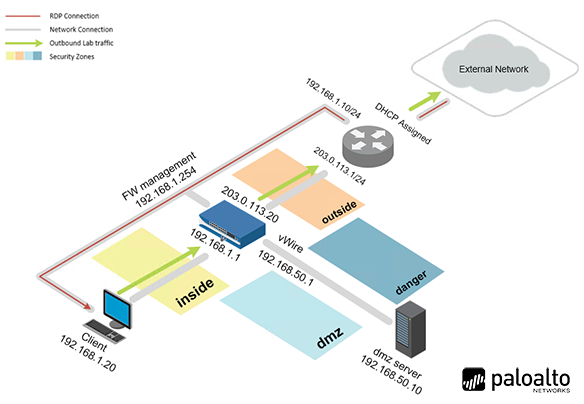
Pod Topology Palo Alto Cybersecurity Gateway PAN8 Pod
Virtual Machines
Documentation & Resources
Setup: Install PAN8 Cybersecurity Gateway via the Course Manager. See the Admin Guide →
Related Labs
Cybersecurity Foundation v2
Learn the fundamentals of cybersecurity and the concepts required to recognize and potentially mi...
Network Security Fundamentals v2
Introduce the fundamentals of network security including how to recognize and potentially defend ...
Cloud Security Fundamentals v2
Learn the fundamentals of cloud security, how to recognize threats, and how to defend against clo...
Cloud Security Automation
Fundamentals of cloud security automation with Kubernetes, Minikube, DevSecOps practices, vulnera...