Cybersecurity Gateway PAN9
Overview
The Cybersecurity Gateway labs enable learners to build an understanding of the fundamental principles of networking. Through hands-on practice, learners will explore the general concepts involved in maintaining a secure network computing environment, using Palo Alto Networks firewalls. Learners examine and implement basic networking configuration techniques, as well as describe general networking fundamentals.
Learn more about Palo Alto Networks: Palo Alto Networks Cybersecurity Academy
What You Will Learn
- Configure TCP/IP, DHCP, and virtual IP addresses on Palo Alto Networks firewalls
- Create and analyze packet captures to understand network traffic flows
- Use the Application Command Center to detect and investigate threats
- Protect sensitive data and prevent internet threats with file blocking
- Forward and back up firewall logs for centralized security monitoring
Best For
- Learners building foundational networking skills through hands-on firewall configuration
- IT learners new to Palo Alto Networks seeking practical gateway-level experience
- Educators teaching introductory networking and security with firewalls
- Organizations onboarding staff who need baseline knowledge of network monitoring and log management
Prerequisites
- Basic computer literacy and familiarity with web browsers
- General understanding of networking concepts (IP addressing, TCP/IP)
- No prior firewall or Palo Alto Networks experience required
Lab Exercises (11 labs)
| # | Title |
|---|---|
| 1 | Configuring TCP/IP and a Virtual Router |
| 2 | Configuring DHCP |
| 3 | Configuring Virtual IP Addresses |
| 4 | Creating Packet Captures |
| 5 | Analyzing Packet Captures |
| 6 | Using the Application Command Center to Find Threats |
| 7 | Analyzing Firewall Logs |
| 8 | Protecting Sensitive Data |
| 9 | Preventing Threats from the Internet with File Blocking |
| 10 | Log Forwarding to Linux (Setup syslog to DMZ Server) |
| 11 | Backing up Firewall Logs |
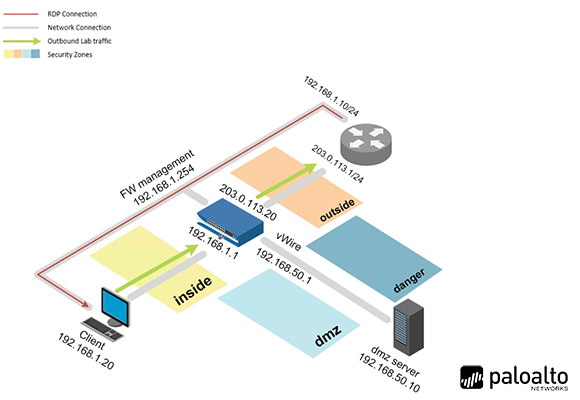
Pod Topology Palo Alto Cybersecurity Gateway PAN9 Pod
Virtual Machines
Documentation & Resources
Setup: Install Palo Alto Networks Cybersecurity Gateway - v9.0 via the Course Manager. See the Admin Guide →
Previous Versions
Related Labs
Cybersecurity Foundation v2
Learn the fundamentals of cybersecurity and the concepts required to recognize and potentially mi...
Cybersecurity Essentials PAN9
Learn to secure a network computing environment through the application of security controls, usi...
Network Security Fundamentals v2
Introduce the fundamentals of network security including how to recognize and potentially defend ...
Firewall Essentials v11.0
Gain an in-depth knowledge of how to install, configure and manage a firewall.