Firewall Essentials v11.0
Overview
These labs will enhance the learner's understanding of how to configure and manage Palo Alto Networks firewalls. The learner will gain hands-on experience configuring, managing, and monitoring a firewall in a lab environment.
Learn more about Palo Alto Networks: Palo Alto Networks Cybersecurity Academy
What You Will Learn
- Install, configure, and manage Palo Alto Networks firewalls from initial setup
- Create and manage security policy rules, NAT policies, and security zones
- Control application usage with App-ID and block threats using security profiles
- Implement User-ID and SSL decryption to inspect encrypted traffic
- Monitor firewall activity using logs, reports, and the Application Command Center
Best For
- IT professionals preparing for Palo Alto Networks PCNSA or PCNSE certification exams
- Network and security engineers deploying or managing Palo Alto firewalls in production
- Educators delivering advanced firewall configuration and management courses
- Organizations training staff on enterprise firewall deployment, NAT, App-ID, and threat prevention
Prerequisites
- Solid understanding of networking fundamentals (routing, switching, NAT, DNS)
- Familiarity with basic cybersecurity concepts (firewalls, security policies, encryption)
- Prior experience with Palo Alto Academy courses or equivalent firewall knowledge is recommended
Lab Exercises (14 labs)
| # | Title |
|---|---|
| 1 | Configuring Initial Firewall Settings |
| 2 | Managing Firewall Configurations |
| 3 | Managing Firewall Administrator Accounts |
| 4 | Connecting the Firewall to Production Networks with Security Zones |
| 5 | Creating and Managing Security Policy Rules |
| 6 | Creating and Managing NAT Policy Rules |
| 7 | Controlling Application Usage with App-ID |
| 8 | Blocking Known Threats Using Security Profiles |
| 9 | Blocking Inappropriate Web Traffic with Advanced URL Filtering |
| 10 | Blocking Unknown Threats with WildFire |
| 11 | Controlling Access to Network Resources with User-ID |
| 12 | Using Decryption to Block Threats in Encrypted Traffic |
| 13 | Locating Valuable Information Using Logs and Reports |
| 14 | Capstone |
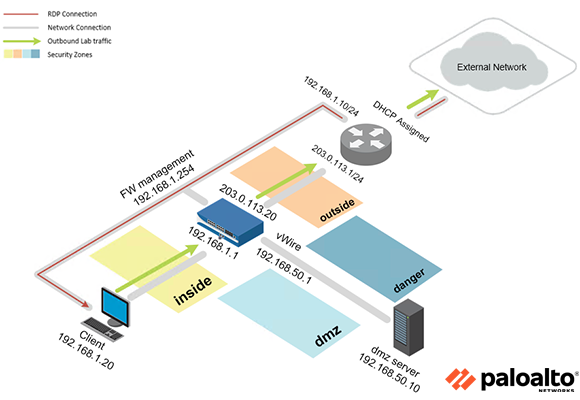
Pod Topology Palo Alto Firewall Essentials PAN 11.0 Pod
Virtual Machines
Documentation & Resources
- Firewall Essentials PAN 11.0 Planning and Installation Guide (PDF)
- Firewall 11.0 Essentials Pod Install Guide for Proxmox VE (external)
- Release Notes (external)
Setup: Install Palo Alto Networks Firewall Essentials v11.0 via the Course Manager. See the Admin Guide →
Previous Versions
Related Labs
Cybersecurity Essentials PAN9
Learn to secure a network computing environment through the application of security controls, usi...
Security Operations Fundamentals v2
A high-level introduction to the general concepts of SOC (Security Operations Center) and SecOps ...
Cybersecurity Gateway PAN9
Explore the general concepts involved in maintaining a secure network computing environment, usin...
Cybersecurity Foundation v2
Learn the fundamentals of cybersecurity and the concepts required to recognize and potentially mi...