Firewall Essentials (PAN-OS 7)
Overview
These labs allow learners to gain an in-depth knowledge of how to install, configure and manage their firewall, as well as configuration steps for the security, networking, threat prevention, logging and reporting features of the Palo Alto Networks Operation System (PAN-OS).
Learn more about Palo Alto Networks: Palo Alto Networks Cybersecurity Academy
Lab Exercises (15 labs)
| # | Title |
|---|---|
| 1 | Initial config |
| 2 | Basic Interface Configuration |
| 3 | NAT and Security Policies |
| 4 | Basic App-ID |
| 5 | URL Filtering |
| 6 | Implementing Anti-virus and Anti-spyware Protection |
| 7 | File Blocking and Wildfire |
| 8 | Decryption |
| 9 | Management and Reporting |
| 10 | Custom Apps |
| 11 | Custom Data Patterns |
| 12 | Custom Vulnerability Signatures |
| 13 | User-ID |
| 14 | Quality of Service |
| 15 | Advanced Monitoring and Reporting |
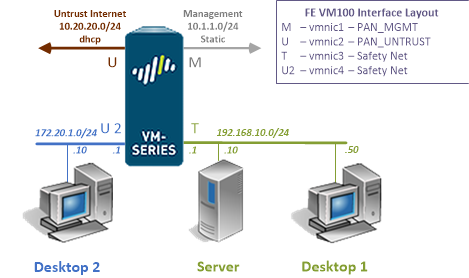
Pod Topology Palo Alto Firewall Essentials GW and FE Pods
Virtual Machines
Documentation & Resources
Related Labs
Cybersecurity Foundation v2
Learn the fundamentals of cybersecurity and the concepts required to recognize and potentially mi...
Network Security Fundamentals v2
Introduce the fundamentals of network security including how to recognize and potentially defend ...
Cloud Security Fundamentals v2
Learn the fundamentals of cloud security, how to recognize threats, and how to defend against clo...
Cloud Security Automation
Fundamentals of cloud security automation with Kubernetes, Minikube, DevSecOps practices, vulnera...