Cybersecurity Essentials PAN9
Overview
The Cybersecurity Essentials PAN9 labs allow learners to gain hands-on practice in evaluating cybersecurity principles and demonstrating how to secure a network computing environment through the application of security controls, using Palo Alto Networks firewalls. While examining strategies for network defense, learners will deploy a variety of security methodologies, as well as technologies and concepts used for implementing secure network environments.
Learn more about Palo Alto Networks: Palo Alto Networks Cybersecurity Academy
What You Will Learn
- Implement Zero Trust security controls on Palo Alto Networks firewalls
- Configure authentication, two-factor authentication, and certificate management
- Decrypt SSH and SSL traffic to inspect encrypted threats
- Secure endpoints with vulnerability profiles and dynamic block lists
- Configure GlobalProtect HIP to enforce endpoint compliance policies
Best For
- Learners seeking hands-on experience with enterprise firewall security controls
- IT professionals preparing for Palo Alto Networks PCNSA certification
- Educators delivering intermediate-level cybersecurity courses with real firewall labs
- Organizations training network security staff on authentication, encryption, and threat prevention
Prerequisites
- Completion of Cybersecurity Foundation and Gateway courses or equivalent knowledge
- Working understanding of TCP/IP, DNS, and basic firewall concepts
- Familiarity with Palo Alto Networks firewall interface is recommended
Lab Exercises (12 labs)
| # | Title |
|---|---|
| 1 | Creating a Zero Trust Environment |
| 2 | Configuring Authentication |
| 3 | Using Two-Factor Authentication to Secure the Firewall |
| 4 | Allowing Only Trusted Applications |
| 5 | Managing Certificates |
| 6 | Decrypting SSH Traffic |
| 7 | Decrypting SSL Inbound Traffic |
| 8 | Securing Endpoints using Vulnerability Profiles |
| 9 | Stopping Reconnaissance Attacks |
| 10 | Using Dynamic Block Lists |
| 11 | Denying International Attackers |
| 12 | Configuring HIP for Global Protect |
Pod Topology Palo Alto Cybersecurity Essentials PAN9 Pod
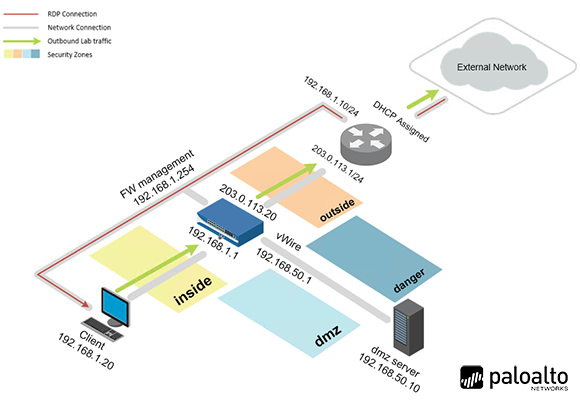
Virtual Machines
Documentation & Resources
Setup: Install PAN9 Cybersecurity Essentials via the Course Manager. See the Admin Guide →
Previous Versions
Related Labs
Cybersecurity Gateway PAN9
Explore the general concepts involved in maintaining a secure network computing environment, usin...
Firewall Essentials v11.0
Gain an in-depth knowledge of how to install, configure and manage a firewall.
Security Operations Fundamentals v2
A high-level introduction to the general concepts of SOC (Security Operations Center) and SecOps ...
Cybersecurity Foundation v2
Learn the fundamentals of cybersecurity and the concepts required to recognize and potentially mi...