CCNA CyberOps v1
Overview
The CCNA Cyber Ops curriculum prepares you for opportunities in security operation centers as an analyst or incident responder. The hands-on labs focus on the skills needed to monitor, detect and respond to cybersecurity threats. Topics include cryptography, host-based security analysis, security monitoring, computer forensics, attack methods and incident reporting and handling. All NETLAB+ supported labs in the CCNA Cyber Ops course are supported by the CCNA Cyber Ops Pod.
Learn more about Cisco Networking Academy: Cisco Networking Academy
What You Will Learn
- Analyze Windows processes, threads, handles, and registry for security threats
- Navigate the Linux filesystem and manage permissions for security operations
- Capture and analyze network protocols using Wireshark including TCP, UDP, DNS, and HTTP
- Encrypt and decrypt data using OpenSSL and examine cryptographic techniques
- Extract executables from packet captures and investigate threat actor activity
Lab Exercises (36 labs)
| # | Title |
|---|---|
| 2.0.1.2 | Identify Running Processes |
| 2.1.2.10 | Exploring Processes, Threads, Handles, and Windows Registry |
| 2.2.1.10 | Create User Accounts |
| 2.2.1.11 | Using Windows PowerShell |
| 2.2.1.12 | Windows Task Manager |
| 2.2.1.13 | Monitor and Manage System Resources in Windows |
| 3.1.2.6 | Working with Text Files in the CLI |
| 3.1.2.7 | Getting Familiar with the Linux Shell |
| 3.1.3.4 | Linux Servers |
| 3.2.1.4 | Locating Log Files |
| 3.2.2.4 | Navigating the Linux Filesystem and Permission Settings |
| 4.1.1.7 | Tracing a Route |
| 4.1.2.10 | Introduction to Wireshark |
| 4.4.2.8 | Using Wireshark to Examine Ethernet Frames |
| 4.5.2.4 | Using Wireshark to Observe the TCP 3-Way Handshake |
| 4.5.2.10 | Exploring Nmap |
| 4.6.2.7 | Using Wireshark to Examine a UDP DNS Capture |
| 4.6.4.3 | Using Wireshark to Examine TCP and UDP Captures |
| 4.6.6.5 | Using Wireshark to Examine HTTP and HTTPS |
| 7.0.1.2 | What's Going On? |
| 7.3.1.6 | Exploring DNS Traffic |
| 7.3.2.4 | Attacking a mySQL Database |
| 7.3.2.5 | Reading Server Logs |
| 9.0.1.2 | Creating Codes |
| 9.1.1.6 | Encrypting and Decrypting Data Using OpenSSL |
| 9.1.1.7 | Encrypting and Decrypting Data using a Hacker Tool |
| 9.1.1.8 | Examining Telnet and SSH in Wireshark |
| 9.1.2.5 | Hashing Things Out |
| 9.2.2.7 | Certificate Authority Stores |
| 12.1.1.7 | Snort and Firewall Rules |
| 12.2.1.5 | Convert Data into a Universal Format |
| 12.2.2.9 | Regular Expression Tutorial |
| 12.2.2.10 | Extract an Executable from a PCAP |
| 12.4.1.1 | Interpret HTTP and DNS Data to Isolate Threat Actor |
| 12.4.1.2 | Isolated Compromised Host Using 5-Tuple |
| SBA | CCNA Cybersecurity Operations Skills Assessment |
Pod Topology CCNA Cyber Ops Pod
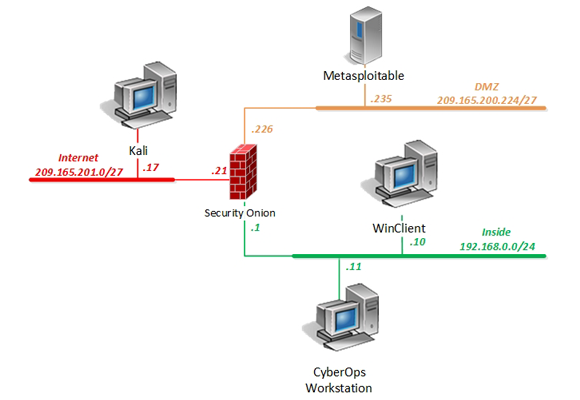
Virtual Machines
Storage requirements
37.1 GB per master pod instance
Documentation & Resources
Setup: Install Cisco CCNA Cyber Ops v1 via the Course Manager. See the Admin Guide →
Related Labs
CyberOps Associate v1
Build cybersecurity operations skills with labs covering security monitoring, host-based analysis...
Network Security v1
Master network security concepts including firewalls, VPNs, and intrusion prevention with hands-on labs.
CCNA1: Introduction to Networks v7
Build foundational networking knowledge with the CCNA v7 curriculum covering network fundamentals...
CCNA2: Switching, Routing and Wireless Essentials v7
Develop skills in switching, routing, and wireless networking with hands-on CCNA v7 labs.
What organizations are saying about Cisco Networking Academy
NETLAB+ has enabled us to provide hands-on training that would otherwise be financially out of reach for individual colleges.
BACCC Program Coordinator
Program Coordinator, Bay Area Community College Consortium
Our students are getting jobs at national labs, at Intel, at Sandia — places they never thought they could work.
IT Program Director
IT Program Director, Northern New Mexico College