CCNA1: Introduction to Networks v7
Overview
All NETLAB+ supported labs in the CCNA1: Introduction to Networks v7 course are supported by the Multi-Device Pod (MDP), Multi-Purpose Academy Pod (MAP), and Multi-Purpose Academy Pod with ASA (MAP w/ASA). NETLAB+ VE 19.5.0 or greater is required.
Learn more about Cisco Networking Academy: Cisco Networking Academy
What You Will Learn
- Configure basic switch and end device settings using Cisco IOS CLI
- Analyze network traffic using Wireshark packet captures
- Design and implement IPv4 VLSM and IPv6 addressing schemes
- Secure network devices with SSH and password policies
- Troubleshoot network layer connectivity using ping and traceroute
Best For
- Learners beginning their Cisco CCNA certification journey
- Network technicians building foundational IP addressing and connectivity skills
- Professionals transitioning into networking roles
- Educators delivering introductory Cisco Networking Academy courses
Prerequisites
- No prior networking experience required
- Basic computer literacy and familiarity with operating systems
- Interest in pursuing a career in network administration
Lab Exercises (15 labs)
| # | Title | Pod Required |
|---|---|---|
| 2.9.2 | Basic Switch and End Device Configuration | MDP, MAP, or MAP w/ASA |
| 3.7.10 | Use Wireshark to View Network Traffic | MDP, MAP, or MAP w/ASA |
| 4.6.6 | View Wired and Wireless NIC Information | MDP, MAP, or MAP w/ASA |
| 7.1.6 | Use Wireshark to Examine Ethernet Frames | MDP, MAP, or MAP w/ASA |
| 7.2.7 | View Network Device MAC Addresses | MDP, MAP, or MAP w/ASA |
| 7.3.7 | View the Switch MAC Address Table | MDP, MAP, or MAP w/ASA |
| 10.4.3 | Build a Switch and Router Network | MDP, MAP, or MAP w/ASA |
| 11.10.2 | Design and Implement a VLSM Addressing Scheme | MDP, MAP, or MAP w/ASA |
| 12.7.4 | Identify IPv6 Addresses | MDP, MAP, or MAP w/ASA |
| 12.9.2 | Configure IPv6 Addresses on Network Devices | MDP, MAP, or MAP w/ASA |
| 13.3.2 | Use Ping and Traceroute to Test Network Connectivity | MDP, MAP, or MAP w/ASA |
| 16.4.7 | Configure Network Devices with SSH | MDP, MAP, or MAP w/ASA |
| 16.5.2 | Secure Network Devices | MDP, MAP, or MAP w/ASA |
| 17.7.6 | Troubleshoot Connectivity Issues | MDP, MAP, or MAP w/ASA |
| ITN | Skills Assessment | MDP, MAP, or MAP w/ASA |
Pod Topology Multi-Device Pod
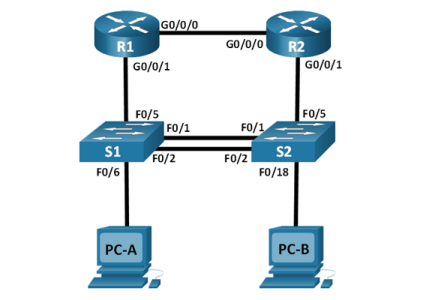
Virtual Machines
Also compatible with Multi-Purpose Academy Pod (MAP) and Multi-Purpose Academy Pod with ASA (MAP w/ASA).
Documentation & Resources
- Real Equipment Pod Management Guide (PDF)
- Multi-Device Pod Installation Guide (PDF)
- Release Notes (external)
Setup: Install CCNA1: Introduction to Networks v7.0 via the Course Manager. See the Admin Guide →
Previous Versions
Related Labs
CCNA2: Switching, Routing and Wireless Essentials v7
Develop skills in switching, routing, and wireless networking with hands-on CCNA v7 labs.
CCNA3: Enterprise Networking, Security, and Automation v7
Master enterprise networking concepts including WAN, security, and network automation with CCNA v7 labs.
CCNA Security v2.0
Learn network security fundamentals with hands-on labs covering ASA firewalls, VPNs, AAA, and ACLs.
CCNP Enterprise: Core Networking (ENCOR) v8
Master advanced enterprise networking with labs covering switching, routing, wireless, security, ...
What organizations are saying about Cisco Networking Academy
NETLAB+ has enabled us to provide hands-on training that would otherwise be financially out of reach for individual colleges.
BACCC Program Coordinator
Program Coordinator, Bay Area Community College Consortium
Our students are getting jobs at national labs, at Intel, at Sandia — places they never thought they could work.
IT Program Director
IT Program Director, Northern New Mexico College