CCNA1: Introduction to Networks v6
Overview
All NETLAB+ supported labs in the CCNA1 Routing and Switching - Introduction to Networks v6 course are supported by both the Multi-purpose Academy Pod (MAP) and Multi-purpose Academy Pod w/ASA (MAP w/ASA).
Learn more about Cisco Networking Academy: Cisco Networking Academy
Lab Exercises (22 labs)
| # | Title | Pod Required |
|---|---|---|
| 0.0.0.1 | Initializing and Reloading a Router and Switch | MAP or MAP w/ASA |
| 2.3.3.3 | Building a Simple Network | MAP or MAP w/ASA |
| 2.3.3.4 | Configuring a Switch Management Address | MAP or MAP w/ASA |
| 3.4.1.2 | Using Wireshark to View Network Traffic | MAP or MAP w/ASA |
| 5.1.1.7 | Using Wireshark to Examine Ethernet Frames | MAP or MAP w/ASA |
| 5.1.2.8 | MAP or MAP w/ASA | |
| MAP or MAP w/ASA | None | |
| 6.3.2.7 | MAP or MAP w/ASA | |
| 6.5.1.2 | MAP or MAP w/ASA | |
| 7.2.5.3 | Identifying IPv6 Addresses | MAP or MAP w/ASA |
| 7.2.5.4 | Configuring IPv6 Addresses on Network Devices | MAP or MAP w/ASA |
| 7.3.2.7 | Testing Network Connectivity with Ping and Traceroute | MAP or MAP w/ASA |
| 8.1.4.8 | Designing and Implementing a Subnetted IPv4 Addressing Scheme | MAP or MAP w/ASA |
| 8.2.1.5 | Designing and Implementing a VLSM Addressing Scheme | MAP or MAP w/ASA |
| 9.2.4.3 | Using Wireshark to Examine TCP and UDP Captures | MAP or MAP w/ASA |
| 11.2.4.6 | Accessing Network Devices with SSH | MAP or MAP w/ASA |
| 11.2.4.7 | Examining Telnet and SSH in Wireshark | MAP or MAP w/ASA |
| 11.2.4.8 | Securing Network Devices | MAP or MAP w/ASA |
| 11.3.4.6 | Using the CLI to Gather Network Device Information | MAP or MAP w/ASA |
| 11.4.3.5 | Troubleshooting Connectivity Issues | MAP or MAP w/ASA |
| Appendix | Observing ARP with the Windows CLI, IOS CLI, and Wireshark | MAP or MAP w/ASA |
| SBA | Skills-Based Assessment | MAP or MAP w/ASA |
Pod Topology Multi-Purpose Academy Pod
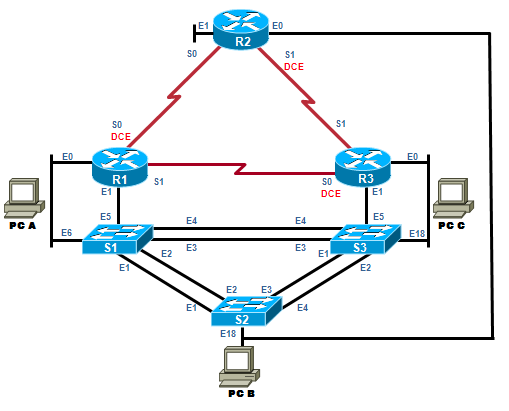
Virtual Machines
Also compatible with Multi-purpose Academy Pod w/ASA (MAP w/ASA).
Documentation & Resources
Related Labs
CCNA1: Introduction to Networks v7
Build foundational networking knowledge with the CCNA v7 curriculum covering network fundamentals...
CCNA2: Switching, Routing and Wireless Essentials v7
Develop skills in switching, routing, and wireless networking with hands-on CCNA v7 labs.
CCNA3: Enterprise Networking, Security, and Automation v7
Master enterprise networking concepts including WAN, security, and network automation with CCNA v7 labs.
CCNA Security v2.0
Learn network security fundamentals with hands-on labs covering ASA firewalls, VPNs, AAA, and ACLs.
What organizations are saying about Cisco Networking Academy
NETLAB+ has enabled us to provide hands-on training that would otherwise be financially out of reach for individual colleges.
BACCC Program Coordinator
Program Coordinator, Bay Area Community College Consortium
Our students are getting jobs at national labs, at Intel, at Sandia — places they never thought they could work.
IT Program Director
IT Program Director, Northern New Mexico College